Roster Members Are Live: A Folder Per Artist, and the Right People In It
Ask a label manager to show you how an artist gets a file, and you will usually watch the same short performance. A shared drive opens. There is a folder with the artist's name on it, and next to it four more folders with variations of the same name. Somebody checks who has the link. Somebody else is not sure whether the producer still has access from the last release, or whether that access also covers the three other acts in the parent folder.
The filing is a symptom. The real problem is access, and it is the reason so many labels end up doing the same work twice.
As of this week, Vandall Business answers it differently. You define your roster once, and access follows the artist.
Why access breaks when it follows the file
Most label setups grant access per file or per folder, which sounds reasonable until you look at what a real working relationship does over a year.
A producer joins for two tracks and gets a folder link. A mixer joins for one of those tracks and gets a different link. The artist's manager needs to see everything the artist is on, which is now spread across both. Six months later the producer is off the project, but nobody revokes anything, because revoking means finding every link anyone ever sent.
Each of those grants was correct on the day it was made. The problem is that they describe moments, while a roster is a set of relationships that last, change shape, and need to be reasoned about as a whole. When your permissions model cannot express "this person works with this artist," you end up re-deriving that fact by hand every single time it matters.
The second thing that breaks is the direction of the work. If a label holds the files and grants access outward, then everything the artist makes has to be sent in. The artist finishes a mix, exports it, uploads it somewhere, and messages someone. That handoff is where versions get lost, because the moment a file has to travel, two copies of it exist.
Put the artist in the model
The fix is to make the artist a thing your system knows about, rather than a word in a folder name.
That is what a roster member is in Vandall. It is the act as your label refers to it, with a name, a short description and a photo. Three properties matter more than they sound:
It exists without a login. An artist exists whether or not anybody signs in for them. If you host a catalogue for an act you never speak to, that works exactly the same as an act with five people around it. You are not forced to invite a human being in order to file work.
It owns a folder. Creating the artist creates the place their work lives. There is no second step where somebody decides where this act's tracks should go, and no chance of two folders for the same name.
People attach underneath it. The artist, their producer, their mixer, their manager. You invite them by email, they accept in the Vandall app, and what they can reach is that artist's folder. Other acts on your roster are not visible to them. When somebody stops working with an act, you change it in one place, because there is only one place it was ever expressed.
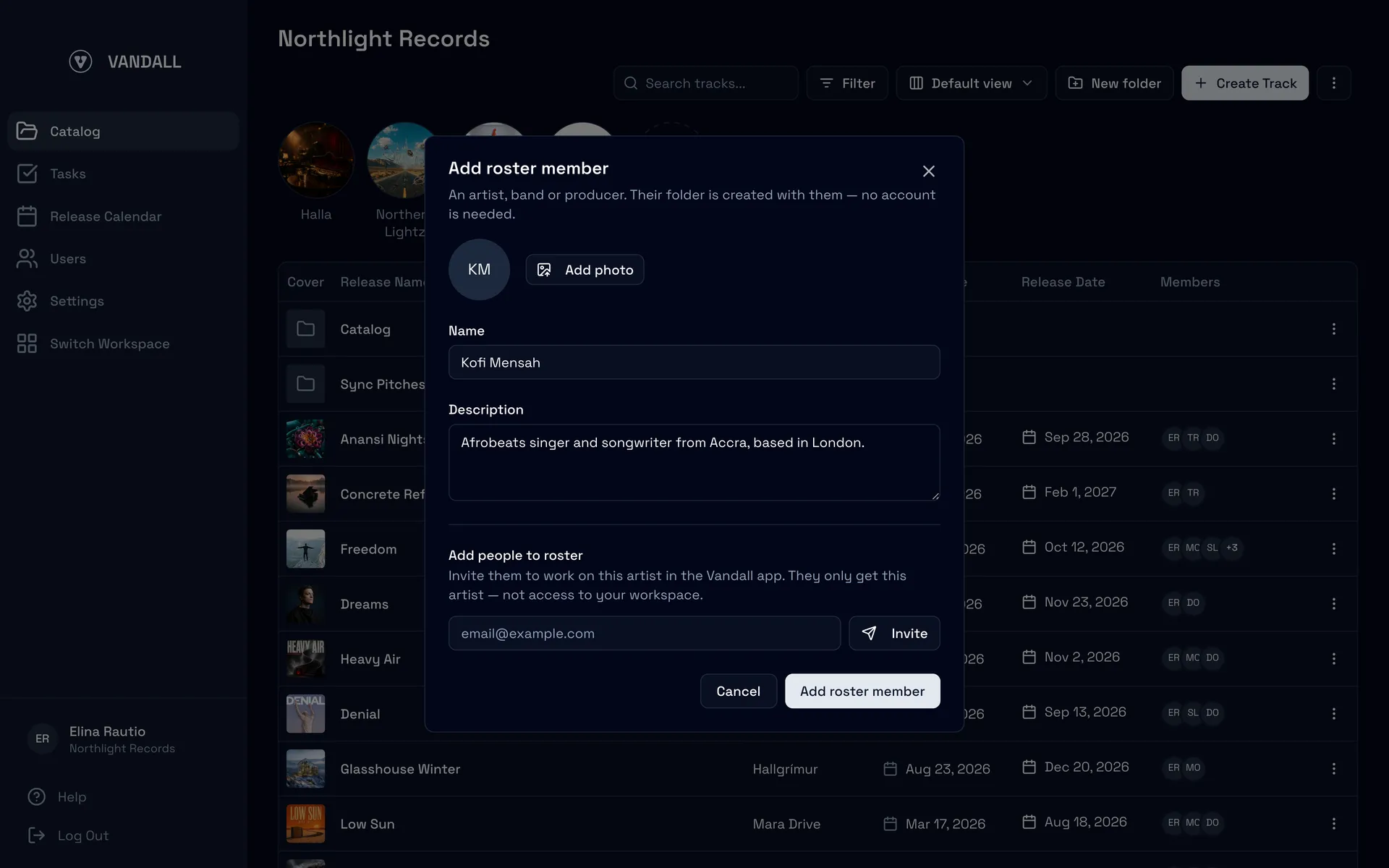
The same dialog that creates the artist invites the people around them, and says plainly what the invitation grants: this artist, not your workspace.
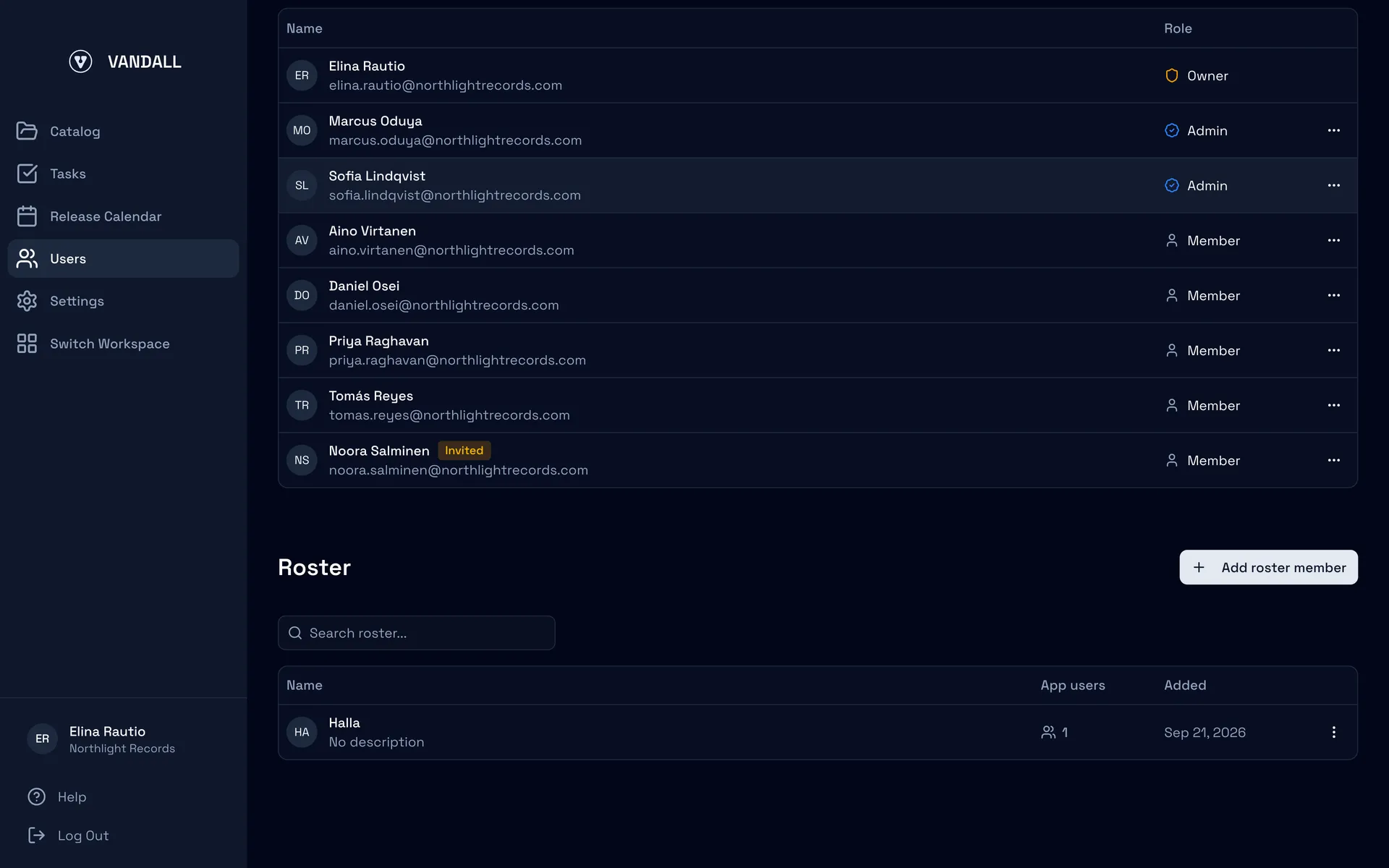
Your roster, defined once. Each act carries a name, a description and a photo, and the App users column shows how many people are attached to it.
What that changes on a normal Tuesday
The useful part is what stops happening.
Nobody sends you files. An invited producer opens the app, sees the label workspaces they belong to, opens the artist folder, and moves a track into it. It is on your dashboard when they do that, with its versions and its comments attached. There is no upload step, no link, and no message that says "latest master, final v3."
You add a person once per artist. Previously, getting a collaborator onto work meant naming them on each piece of it. Now you say once that this person works with this artist, and that answer applies to the work already there and the work that has not been made yet.
The catalogue and the roster arrive together. If you are still running the label in a spreadsheet, import it as CSV. Vandall reads the artist names out of the file and offers to add them to your roster, and the imported tracks file themselves into the matching artist folder. You get the catalogue and the structure in one pass instead of importing rows and then organising them.
People can change jobs. Somebody who came in as an artist's producer sometimes ends up doing label work. You can promote them to a full member of your workspace, and the artist work they were already doing stays with them.
What is not in this release
Two things worth being straight about, because they are the questions we get first.
If you imported a catalogue before this week, its tracks are not retroactively filed into roster folders. You can create the roster members and move work into them, but there is no one-click conversion of an existing catalogue yet. That is being built.
And roster access is roster access. Inviting an outside collaborator to an arbitrary folder that is not an artist's is a separate capability, and it is not live.
Try it on one artist
To see whether this fits your label, skip the migration. Pick one act, ideally one with a release in motion and at least one person outside your team working on it.
Add them to your roster on the Users page. Invite the producer or the manager. Ask them to put the current mix in the folder rather than sending it to you. If the next version of that track reaches you without anybody attaching it to a message, the model is doing its job, and you will know within a week whether the rest of the roster should follow.
Start free, or talk to us if you want a walkthrough against your own roster first.