It's late, and the session folder holds fourteen bounces. Two are going to the label, one to the mixing engineer, and the rest are demos you want to keep without losing track of which is which. On most laptops that folder is called something like final_v3_REAL.
Here's how to get that folder into shape in a few minutes, and keep it that way.
Make the whole folder tracks
Open Vandall and press Create multiple tracks on Home. Select the files. Each one becomes its own track, named after the file, so Low Sun.mp3 becomes the track Low Sun.
 Four demos, four tracks. Nothing uploads until you press Import.
Choose the folder they go into, then press Import. If the names need tidying first, press Customize, which creates the tracks as drafts so you can rename any track, type the artist once for the whole batch, and add genre or credits per track. On the web you can also drag the files straight onto Create multiple tracks.
The files keep uploading in the background while you carry on. If one doesn't go through, the row says what failed, and you retry just that one.
 The batch, created and filed. The uploads finish while you work.
Keep every version together
A track holds everything for one song: the mix and the versions before it, stems, artwork and the release details. The bounce you sent last Tuesday stays next to the one you finished today, so nobody has to ask which file is the latest.
Get feedback on the exact second
On audio, a comment can be pinned to the moment it's about. "The vocal's a bit low" arrives with 01:24 attached, and one click jumps there. Replies stay in the same thread.
 Pin a comment to the moment it’s about.
Send it with a link
When a demo has to leave the room, share a link. Whoever gets it presses play in their browser, with no account, sign-up or app.
You decide what the link allows. Turn comments on so they can write back. Turn downloading off and their page has no download button. Add a password for anything that must not travel further. Sent the wrong version? Stop sharing, and the old link stops working for good.
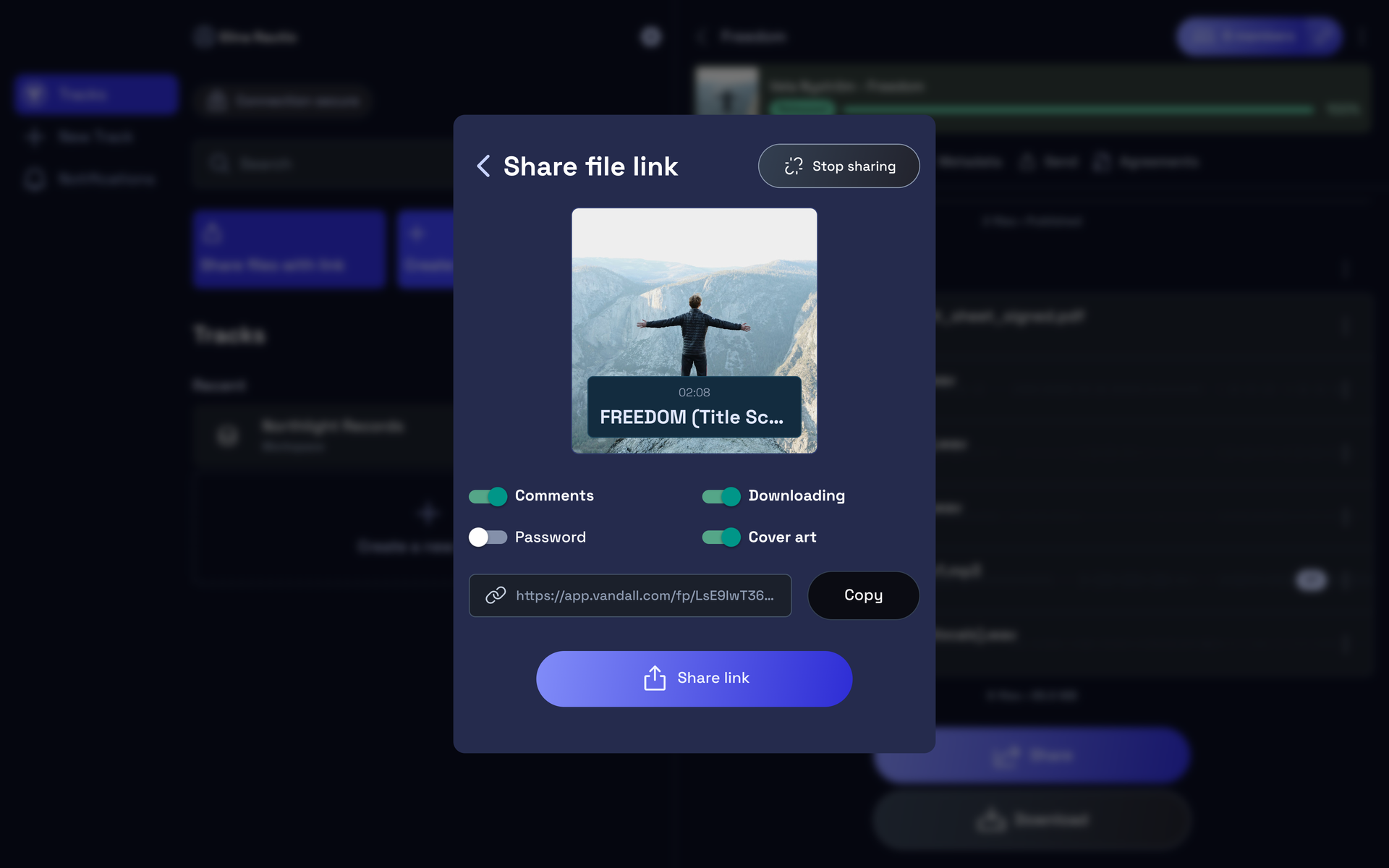 One link, with the switches you need.
Also in Vandall 0.17.0
- Lists that keep up. When someone in your workspace adds, renames, moves or deletes a folder or track, your list shows it without a refresh.
- Uploads that wait for you. On iPhone and Android, close the app mid-upload and the waiting files go up again when you reopen it, with a reminder if uploads are still waiting.
- Required updates inside the app on Android. When a version is too old to keep using, Android can install the update in the app; if that isn’t possible, it opens Google Play.
- New folder, faster. Press Enter to create it, and it opens straight away.
- Fixes. The chat field grows with your text again, the voice recorder no longer sticks on "Preparing…", and play and pause stay in step when you switch tracks.
Next up: playlists

Playlists are coming to the Vandall app next. Put demos in the order you want them heard and send the whole set as one link. We'll write when they're in your hands.
Do it tonight
Update Vandall on your phone, or open it on the web, and select the demos in the folder that's been waiting. The step-by-step guide is in Help: Create several tracks from your files. Something in the way? Press Leave feedback in the app. It comes straight to us.